 小小程日记-笔记分享
MySQL 执行计划(EXPLAIN)详解:从 id 到 Extra 全面解析
Explain 分析
explain select * from students\G;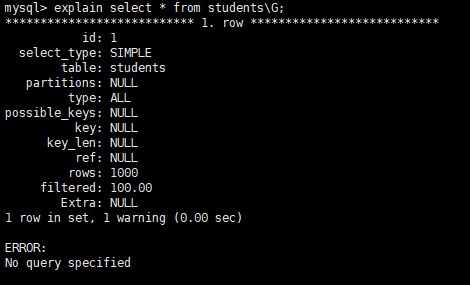
id
select 查询的序列号 ,id 从 1 开始标识,可能是单行记录也可能是多行记录,id 可能不同可能相同也可能为 NULL。不过我是 8.0 版本的 MySQL 没有测试出来 NULL 值情况
单个的情况
explain select * from students ss;
多个相同的情况
explain select es.course_id ,ss.name from enrollments es left join students ss on es.student_id =ss.id;
多个不同的情况
explain select name from students union all select name from teachers;
explain select id, name, (select count(1) from enrollments es where es.student_id = students.id) as cc_count from students;
多个不同和相同同时存在的情况
explain select * from students ss where ss.id in (select es.student_id from enrollments es where es.grade > 1);
explain select ss.name,count(ss.id) from students ss left join enrollments es on ss.id = es.student_id group by ss.id union
select ts.name,count(ts.id) from teachers ts left join courses cs on ts.id=cs.teacher_id group by ts.id;
查询老师和学生任教/上课数量(非优化)

select_type
小查询在大查询中扮演的角色
SIMPLE
最基础的查询类型(包括 join 查询),没有子查询和union的查询
explain select * from students s where id > 100 limit 10;
explain select c.name city_name,s.name school_name from schools s left join citys c on c.id =s.city_id ;
SUBQUERY
出现在 SELECT 列表或 WHERE 子句中的 非相关子查询(即子查询不引用外部查询的任何列),优化器会尝试优化为 semi-join。
explain select * from students ss where ss.id in (select es.student_id from enrollments es where es.grade > 1) or ss.id = 1;
DEPENDENT SUBQUERY
在 select 或者 where 中使用的子查询,相关子查询,查询性能较差,优化器会尝试优化为 semi-join。
explain select id, name, (select count(1) from enrollments es where es.student_id = students.id) as cc_count from students;
MATERIALIZED
(WHERE 子句)物化子查询,必须非相关子查询才行,生成物化表,便于多次访问,提高性能。
explain select * from students ss where ss.id in (select es.student_id from enrollments es where es.grade > 1);
DERIVED
(FROM 子句)在 from 中的子查询生成的派生表
explain select * from (select student_id,count(1) from enrollments es group by es.student_id) as sk;
UNION
UNION 后的 select 查询表。union 和 union all 关键词都会有 UNION 类型的表
explain select name from students union select name from teachers;
explain select name from students union all select name from teachers;
UNION RESULT
结合 UNION 类型来看,UNION 联表操作会去重,所以就会需要生成临时表来进行额外操作。这个 UNION RESULT 就是生成的临时表用来去重。
explain select name from students union select name from teachers;
PRIMARY
子查询或者 UNION 查询最外层的表(不包括join联表查询)。结合具体示例查看学习。
mysql> explain select * from students s where id > 100 limit 10;
+----+-------------+-------+------------+-------+---------------+---------+---------+------+------+----------+-------------+
| id | select_type | table | partitions | type  | possible_keys | key     | key_len | ref  | rows | filtered | Extra       |
+----+-------------+-------+------------+-------+---------------+---------+---------+------+------+----------+-------------+
|  1 | SIMPLE      | s     | NULL       | range | PRIMARY       | PRIMARY | 4       | NULL |  900 |   100.00 | Using where |
+----+-------------+-------+------------+-------+---------------+---------+---------+------+------+----------+-------------+
1 row in set, 1 warning (0.00 sec)

mysql> explain select * from students ss where ss.id in (select es.student_id from enrollments es where es.grade > 1) or ss.id = 1;
+----+-------------+-------+------------+------+---------------+------+---------+------+------+----------+-------------+
| id | select_type | table | partitions | type | possible_keys | key  | key_len | ref  | rows | filtered | Extra       |
+----+-------------+-------+------------+------+---------------+------+---------+------+------+----------+-------------+
|  1 | PRIMARY     | ss    | NULL       | ALL  | PRIMARY       | NULL | NULL    | NULL | 1000 |   100.00 | Using where |
|  2 | SUBQUERY    | es    | NULL       | ALL  | idx_student   | NULL | NULL    | NULL | 5000 |    33.33 | Using where |
+----+-------------+-------+------------+------+---------------+------+---------+------+------+----------+-------------+
2 rows in set, 1 warning (0.00 sec)

mysql> explain select id, name, (select count(1) from enrollments es where es.student_id = students.id) as cc_count from students;
+----+--------------------+----------+------------+------+---------------+-------------+---------+----------------+------+----------+-------------+
| id | select_type        | table    | partitions | type | possible_keys | key         | key_len | ref            | rows | filtered | Extra       |
+----+--------------------+----------+------------+------+---------------+-------------+---------+----------------+------+----------+-------------+
|  1 | PRIMARY            | students | NULL       | ALL  | NULL          | NULL        | NULL    | NULL           | 1000 |   100.00 | NULL        |
|  2 | DEPENDENT SUBQUERY | es       | NULL       | ref  | idx_student   | idx_student | 5       | hi.students.id |    5 |   100.00 | Using index |
+----+--------------------+----------+------------+------+---------------+-------------+---------+----------------+------+----------+-------------+
2 rows in set, 2 warnings (0.00 sec)

mysql> explain select * from students ss where ss.id in (select es.student_id from enrollments es where es.grade > 1);
+----+--------------+-------------+------------+--------+---------------------+---------------------+---------+----------+------+----------+-------------+
| id | select_type  | table       | partitions | type   | possible_keys       | key                 | key_len | ref      | rows | filtered | Extra       |
+----+--------------+-------------+------------+--------+---------------------+---------------------+---------+----------+------+----------+-------------+
|  1 | SIMPLE       | ss          | NULL       | ALL    | PRIMARY             | NULL                | NULL    | NULL     | 1000 |   100.00 | NULL        |
|  1 | SIMPLE       | <subquery2> | NULL       | eq_ref | <auto_distinct_key> | <auto_distinct_key> | 5       | hi.ss.id |    1 |   100.00 | NULL        |
|  2 | MATERIALIZED | es          | NULL       | ALL    | idx_student         | NULL                | NULL    | NULL     | 5000 |    33.33 | Using where |
+----+--------------+-------------+------------+--------+---------------------+---------------------+---------+----------+------+----------+-------------+
3 rows in set, 1 warning (0.00 sec)

mysql> explain select * from (select student_id,count(1) from enrollments es group by es.student_id) as sk;
+----+-------------+------------+------------+-------+---------------+-------------+---------+------+------+----------+-------------+
| id | select_type | table      | partitions | type  | possible_keys | key         | key_len | ref  | rows | filtered | Extra       |
+----+-------------+------------+------------+-------+---------------+-------------+---------+------+------+----------+-------------+
|  1 | PRIMARY     | <derived2> | NULL       | ALL   | NULL          | NULL        | NULL    | NULL | 5000 |   100.00 | NULL        |
|  2 | DERIVED     | es         | NULL       | index | idx_student   | idx_student | 5       | NULL | 5000 |   100.00 | Using index |
+----+-------------+------------+------------+-------+---------------+-------------+---------+------+------+----------+-------------+
2 rows in set, 1 warning (0.01 sec)

mysql> explain select name from students union select name from teachers;
+----+--------------+------------+------------+------+---------------+------+---------+------+------+----------+-----------------+
| id | select_type  | table      | partitions | type | possible_keys | key  | key_len | ref  | rows | filtered | Extra           |
+----+--------------+------------+------------+------+---------------+------+---------+------+------+----------+-----------------+
|  1 | PRIMARY      | students   | NULL       | ALL  | NULL          | NULL | NULL    | NULL | 1000 |   100.00 | NULL            |
|  2 | UNION        | teachers   | NULL       | ALL  | NULL          | NULL | NULL    | NULL |   30 |   100.00 | NULL            |
|  3 | UNION RESULT | <union1,2> | NULL       | ALL  | NULL          | NULL | NULL    | NULL | NULL |     NULL | Using temporary |
+----+--------------+------------+------------+------+---------------+------+---------+------+------+----------+-----------------+
3 rows in set, 1 warning (0.00 sec)

mysql> explain select name from students union all select name from teachers;
+----+-------------+----------+------------+------+---------------+------+---------+------+------+----------+-------+
| id | select_type | table    | partitions | type | possible_keys | key  | key_len | ref  | rows | filtered | Extra |
+----+-------------+----------+------------+------+---------------+------+---------+------+------+----------+-------+
|  1 | PRIMARY     | students | NULL       | ALL  | NULL          | NULL | NULL    | NULL | 1000 |   100.00 | NULL  |
|  2 | UNION       | teachers | NULL       | ALL  | NULL          | NULL | NULL    | NULL |   30 |   100.00 | NULL  |
+----+-------------+----------+------------+------+---------------+------+---------+------+------+----------+-------+
2 rows in set, 1 warning (0.00 sec)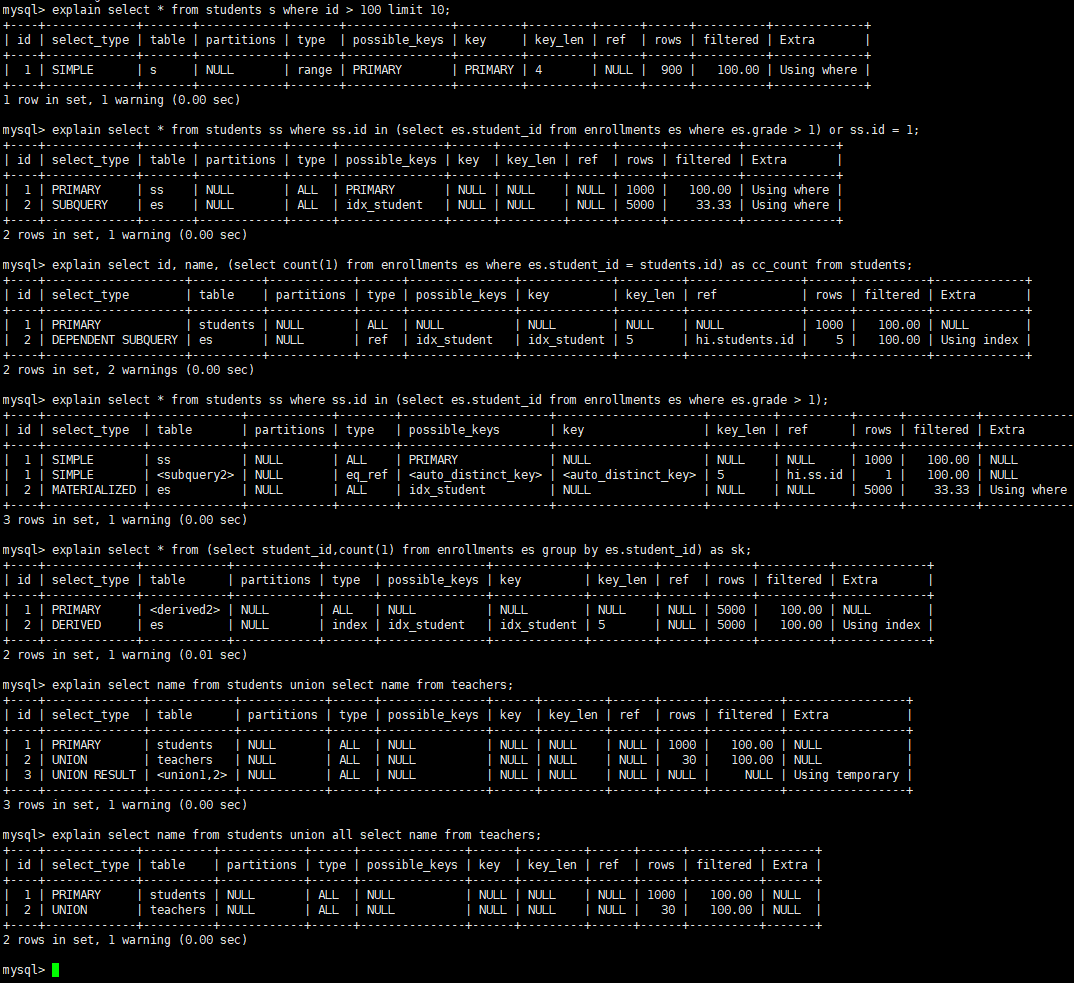
table
用到的表名或者别名或者派生表 <derivedN> 或者联合表 <unionM,N>
partitions
匹配的分区,没有就是 NULL
type⭐
查询数据时使用的访问类型,最重点的字段,决定了查询数据的快慢。
快 -> 慢:
system > const > eq_ref > ref > fulltext > ref_or_null > index_merge > unique_subquery > index_subquery > range > index > ALL
system
存储引擎会精确存储表中的数据,并且表中只有1条数据的特殊情况。
使用下面 DDL 创建测试表
CREATE TABLE `s251102_my`(
    `id` int primary key auto_increment,
    `username` varchar(32) unique key ,
    `remakr` varchar(1024)
)engine=myisam;
开始测试
- 表内还没有数据
explain select * from `s251102_my`;
- 插入一条数据后
insert into `s251102_my` (`username`,`remakr`)values('zhangsan','dh9edhwedwed');
explain select * from `s251102_my`;
- 再插入一条数据后
insert into `s251102_my` (`username`,`remakr`)values('lisi','11dfwefwefgwe');
explain select * from `s251102_my`;
- 删除第二条数据
delete from `s251102_my` where id=2;
explain select * from `s251102_my`;
为了实现对比测试,使用 InnoDB 对比测试
InnoDB 测试
mysql> CREATE TABLE `s251102_idb`(
    -> `id` int primary key auto_increment,
    -> `username` varchar(32) unique key ,
    -> `remakr` varchar(1024)
    -> )engine=innodb;
Query OK, 0 rows affected (0.10 sec)

mysql>
mysql> explain select * from `s251102_idb`;
+----+-------------+-------------+------------+------+---------------+------+---------+------+------+----------+-------+
| id | select_type | table       | partitions | type | possible_keys | key  | key_len | ref  | rows | filtered | Extra |
+----+-------------+-------------+------------+------+---------------+------+---------+------+------+----------+-------+
|  1 | SIMPLE      | s251102_idb | NULL       | ALL  | NULL          | NULL | NULL    | NULL |    1 |   100.00 | NULL  |
+----+-------------+-------------+------------+------+---------------+------+---------+------+------+----------+-------+
1 row in set, 1 warning (0.00 sec)

mysql> insert into `s251102_idb` (`username`,`remakr`)values('zhangsan','dh9edhwedwed');
Query OK, 1 row affected (0.02 sec)

mysql> explain select * from `s251102_idb`;
+----+-------------+-------------+------------+------+---------------+------+---------+------+------+----------+-------+
| id | select_type | table       | partitions | type | possible_keys | key  | key_len | ref  | rows | filtered | Extra |
+----+-------------+-------------+------------+------+---------------+------+---------+------+------+----------+-------+
|  1 | SIMPLE      | s251102_idb | NULL       | ALL  | NULL          | NULL | NULL    | NULL |    1 |   100.00 | NULL  |
+----+-------------+-------------+------------+------+---------------+------+---------+------+------+----------+-------+
1 row in set, 1 warning (0.00 sec)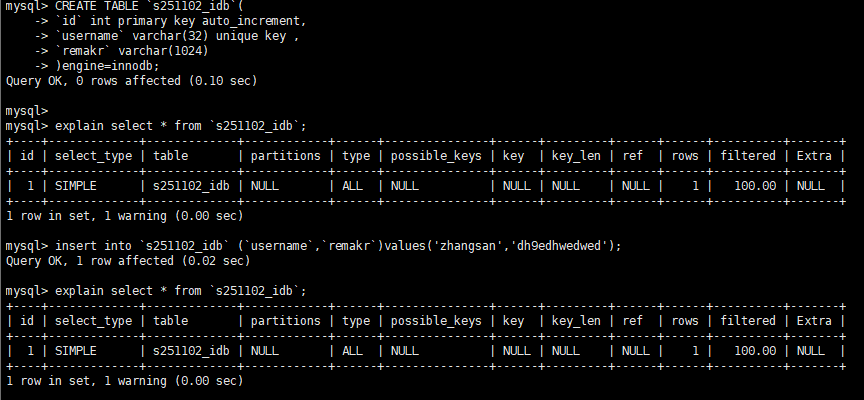
const
使用主键索引或者唯一索引进行查询的情况。
数据准备
CREATE TABLE `t251102_const`(
    id bigint,
    name varchar(255) not null
)Engine = innodb;

INSERT INTO `t251102_const`(`id`,`name`)VALUES
(1,'zhangsan'),(2,'lisi'),(3,'wangwu');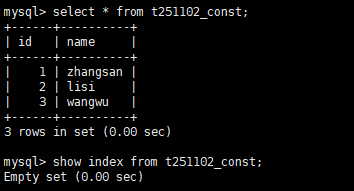
主键索引查询优化
-
未添加主键索引前查询
explain select * from t251102_const where id=2;
-
添加主键索引后查询
alter table `t251102_const` add primary key(`id`);explain select * from t251102_const where id=2;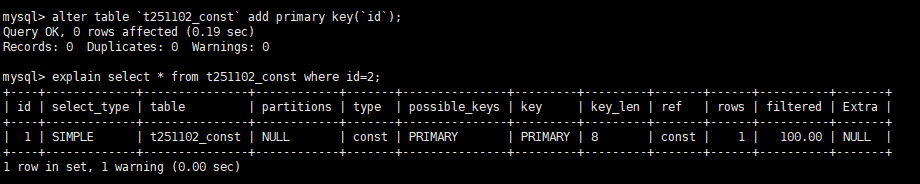
唯一索引查询优化
-
未添加主唯一索引前查询
explain select * from t251102_const where name='zhangsan';
-
添加唯一索引后查询
alter table `t251102_const` add unique key (`name`);explain select * from t251102_const where name='zhangsan';
eq_ref
联表查询时,被驱动表是的查询条件是唯一的(主键索引/唯一索引),如果倒过来,驱动表唯一,被驱动表不唯一就不是这个 eq_ref 了。联表查询中性能最好的
被驱动表条件唯一
explain SELECT es.course_id,ss.name FROM enrollments es left join students ss on ss.id=es.student_id 
驱动表条件唯一,被驱动表不唯一
explain select es.course_id,ss.name from students ss left join enrollments es on es.student_id= ss.id;
ref
使用到了普通索引进行等值查询。
使用
students表进行测试,目前表结构
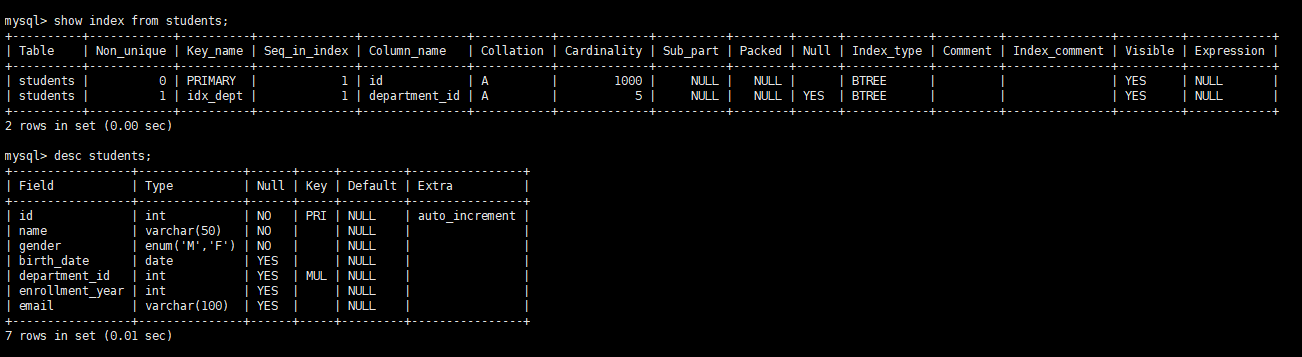
无索引情况查询
explain select * from students where name = 'x';
此时由于查询条件 name 无索引,走全表查找。
添加普通索引查询
alter table students add index idx_name(name);explain select * from students where name = 'x';
添加完索引后走普通索引查询了
ref_or_null
相比 ref 多了一个 NULL 查找的过程,也是走的普通索引和是等值查找。
继续使用上面的
students表进行测试,这次使用NULL值且未添加索引
无索引情况查询
explain select * from students where email = 'x' or email is null;
添加普通索引查询
alter table students add index idx_email(`email`);explain select * from students where email = 'x' or email is null;
有普通索引,但是字段非 NULL
直接使用前面的 name 字段测试
explain select * from students where name = 'x' or name is null;
因为字段非 NULL,所以优化器会把这个条件优化掉。相当于:
explain select * from students where name = 'x';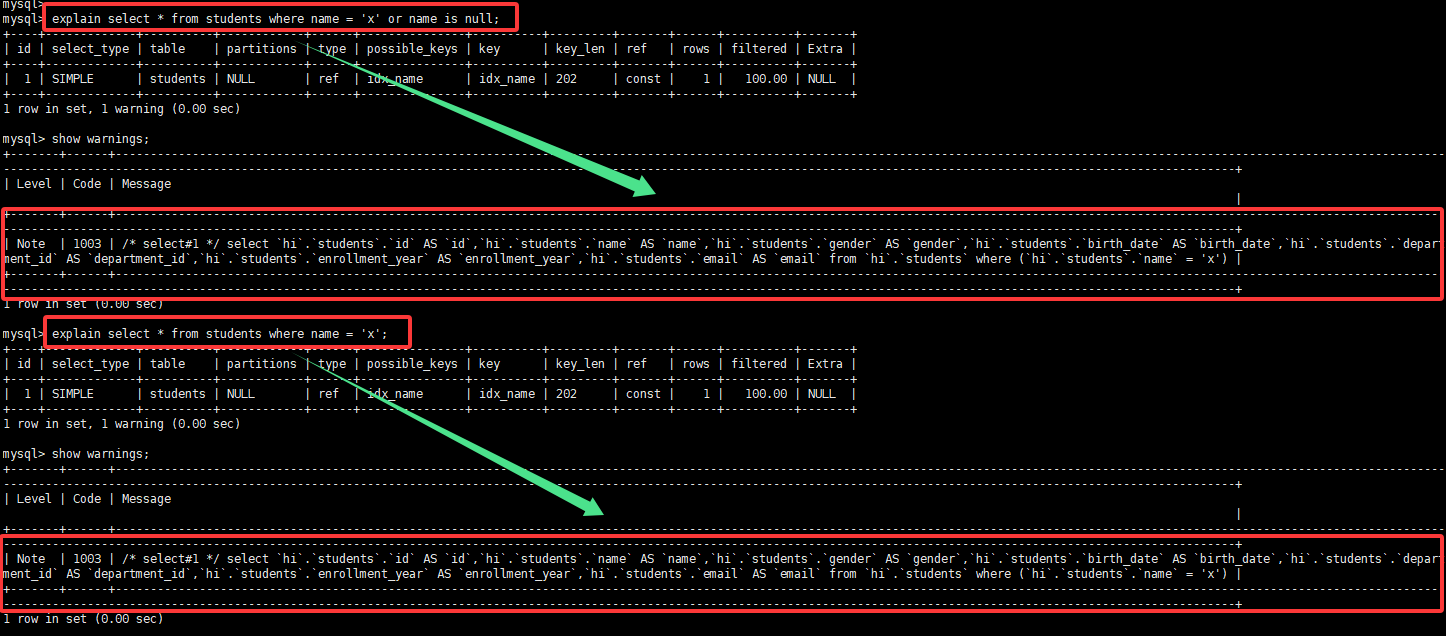
rang
上面提到的几种查询,都有一个前提:等值,就是得进行等值查询,就是 where xx='123',而像 >、<、>=、between and、like 'pattern%' 这种在索引上查询的就是范围查询了。
主键索引、唯一索引、普通索引在范围查找是使用的就是范围查询的方式了。
主键索引范围查询
explain select * from students where id > 5;
唯一索引范围查询
explain select * from students where name > 'x';
普通索引范围查询
explain select * from students where email > 'x';
无索引范围擦好像
继续使用上面的 students 表进行查询,enrollment_year 字段无索引,进行测试。
explain select * from students where enrollment_year > 2000;
index_merge
前面的都是单个字段的查询条件时的索引使用条件,那么多个字段作为查询条件呢?就是使用索引合并进行查询,不过多个字段为查询条件,每个字段都有索引,不是一定会索引索引合并进行查询的,也有可能使用其中一个索引进行查询,具体是由优化器决策的。
使用了索引合并
explain select * from students where id > 5 or name in ('x','y');
explain select * from students where name = 'x' or email > 'x';
未走索引合并
explain select * from students where name = 'x' and email > 'x';
走了 idx_name 索引,因为 name 是等值查询,查询出来的数据可能比较少,然后将 name 查询条件查询出来的数据再走一遍 email > 'x' ,这时 email > 'x' 的查询范围小的多的多,这样子整体查询可能更加快一些。
explain select * from students where id > 99 and name > 'x';
index
index 是全索引扫描,就是将整个索引树遍历一遍查找出来数据,但是相比较下面的全表扫描是快的,因为全部扫描扫的是整个聚簇索引的树,数据完整,索引文件大,扫描的文件更多。
explain select name,id from students;
explain select name,id from students where name != 'x';
explain select name,id from students where name like '%x';
explain select name,id from students where UPPER(name) = 'x';
ALL
全表扫描查询,性能最差,没有索引或者索引失效的时候使用整个,用到这个的话,最好优化。
索引不存在的情况
explain select * from students where enrollment_year > 2000;
索引失效情况
EXPLAIN SELECT * FROM students WHERE UPPER(name) = 'x';
模糊查询情况
EXPLAIN SELECT * FROM students WHERE name LIKE '%x'
ALL 和 index 分析
上面有的查询条件一样,但是有的用 index 查询,有的用 ALL 查询,因为上面使用 index 查询的时候,所有数据在索引能即可查询出来,无需回表查询,而 * 是查询所有列,需要回表操作,所以直接使用 ALL 进行查询。
更直观的例子:
explain select name,id,email from students where name like '%x';
possible_keys
优化器选出来的候选索引,不一定一定使用,可能为 NULL,为 NULL 实际使用也不一定不使用索引。
结合 key 一起分析
key
查询数据时实际使用到的索引,可能为 NULL。
一对一情况
explain select * from students where name = 'x';
候选多个实际一个情况
explain select * from students where name = 'x' and id > 5;
一共两个查询条件,都有对应的索引,候选出两个索引条件 PRIMARY,idx_name,id > 5 走范围查询,但是 name 是等值查询,并且是唯一索引,所以确定使用 idx_name 作为实际索引查询。
多对多
explain select * from students where name > 'x' or id > 5;
同时查询,然后取并集。
候选有值 实际 NULL
explain select * from students where name = 'x' or id > 5;
有两个查询条件,但是优化器可能认为走全表更快
候选 NULL,实际走索引
explain select name,id from students where name like '%x';
优化器认为 %x 无法有效使用索引,但是查询条件又是全部可以在 idx_name 索引内查询到的,所以最终走了 idx_name。
key_len
优化器实际使用的索引的长度,可能一个可能多个也可能为 NULL,一共由三部分组成。
- 数据类型的最大实际使用空间,比如
utf8mb44个字节,varchar(100)就是4*100 = 400; - 字段是否
NULL值,NULL值长度+1,不是就不算; - 字段是否变长字段,变长字段就是
+2;
需要注意的是实际使用的长度,就像联合索引,可能只用到了左侧部分索引,那么就不能全部累加。
测试准备
创建表 t251103key_len 进行测试
create table `t251103key_len`(
    `id` bigint primary key auto_increment,
    `key1` varchar(100),
    `key2` varchar(100) character set utf8 collate utf8_bin,
    `key3` varchar(100) not null,
    `key4` char(100),
    `key5` char(100) not null,

    index idx_key1(`key1`),
    index idx_key2(`key2`),
    index idx_key3(`key3`),
    index idx_key4(`key4`),
    index idx_key5(`key5`)
) engine = innodb character set utf8mb4 collate utf8mb4_bin;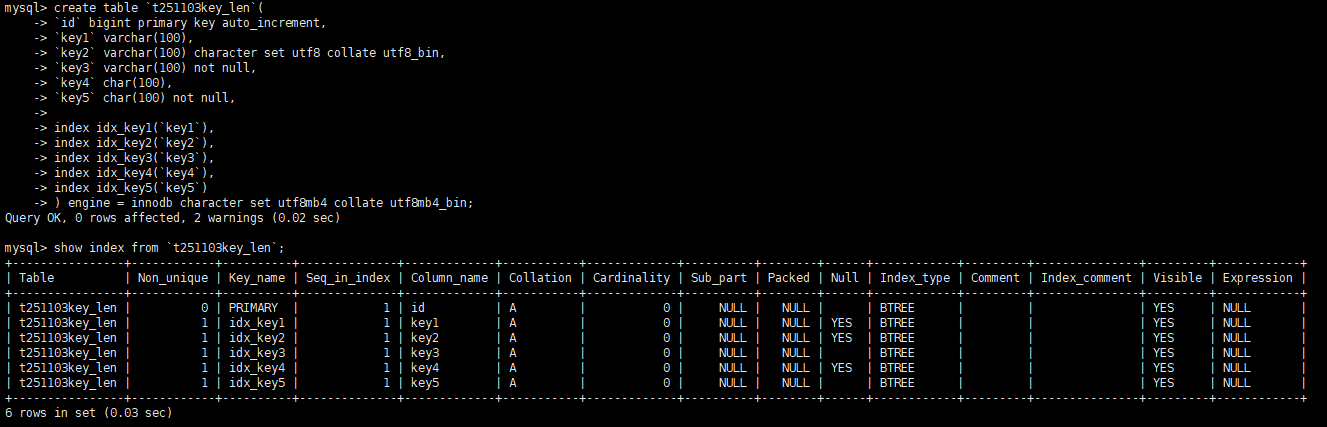
可变字段+可 NULL
explain select * from `t251103key_len` where key1 = 'x';100*4+2+1 = 403

可变字段(utf8)+可 NULL
explain select * from `t251103key_len` where key2 = 'x';100*3+2+1=303

可变字段 + 非 NULL
explain select * from `t251103key_len` where key3 = 'x';100*4+2=402

定长字段 + 可 NULL
explain select * from `t251103key_len` where key4 = 'x';100*4+1=401

定长字段 + 非 NULL
explain select * from `t251103key_len` where key5 = 'x';100*4=400

联合索引
测试前先删除旧索引和创建新联合索引
alter table `t251103key_len` drop index `idx_key1`;
alter table `t251103key_len` drop index `idx_key2`;
alter table `t251103key_len` drop index `idx_key3`;
alter table `t251103key_len` add index idx_key123(`key1`,`key2`,`key3`);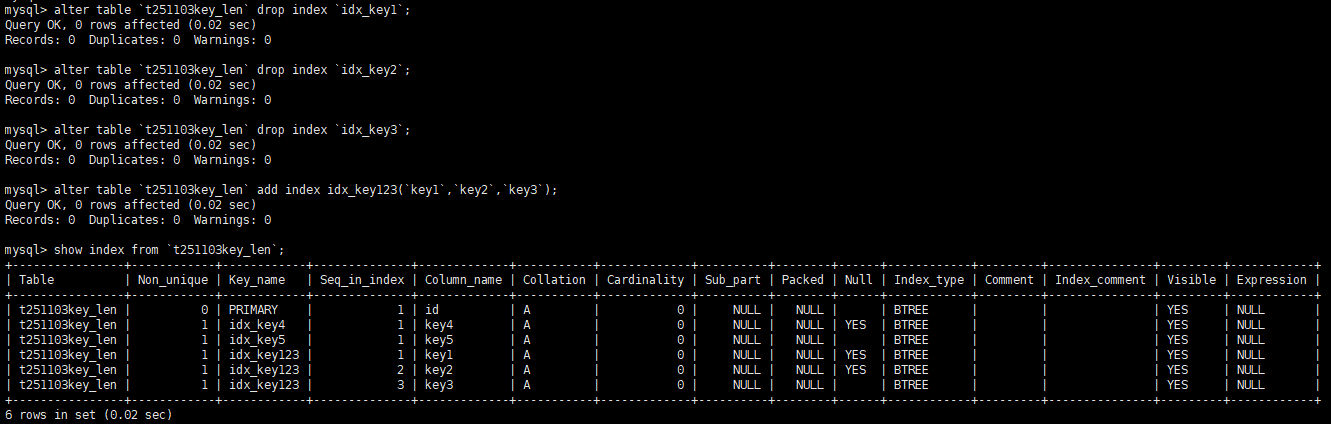
只使用一个字段情况
explain select * from `t251103key_len` where key1 = 'x';
使用两个字段情况
explain select * from `t251103key_len` where key1 = 'x' and key2 = 'x';
全部使用情况
explain select * from `t251103key_len` where key1 = 'x' and key2 = 'x' and key3 = 'x';
ref
表示等值匹配时用什么数据和索引进行匹配,常见的值 const、func、具体表名.具体列名字、NULL。
const
const 表示使用常量进行比较,就是比较的值是固定的,不是动态的。
explain select * from schools where id =1;
explain select * from schools where city_id = 1;
具体表名.具体列名字
常见于 join 连接时,表示和具体列进行数据等值匹配
explain select s.name,c.name from schools s left join citys c on c.id = s.city_id;
explain select s.*,(select name from citys where id = s.city_id) from schools s;
func
等值匹配时匹配的对象是一个函数,但是查询条件使用函数很容易走全表。
explain select s.* from schools s left join citys c on c.name = SUBSTRING(s.address,1,3);
NULL
非等值匹配时为 NULL。
EXPLAIN SELECT * FROM schools WHERE id > 1;
EXPLAIN SELECT * FROM schools WHERE id > rand();
rows
优化器预估可能要全表扫描或者索引扫描的行数。只是预估,不一定准确。
explain select * from schools where city_id=1;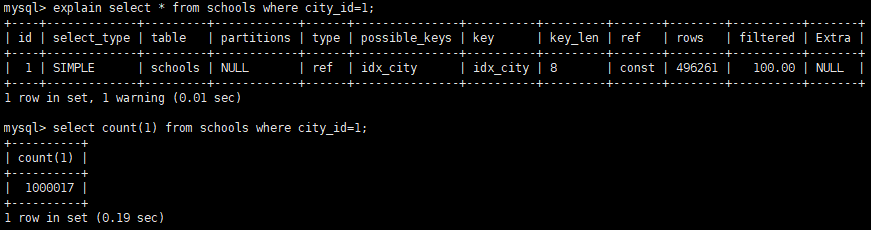
explain select * from schools;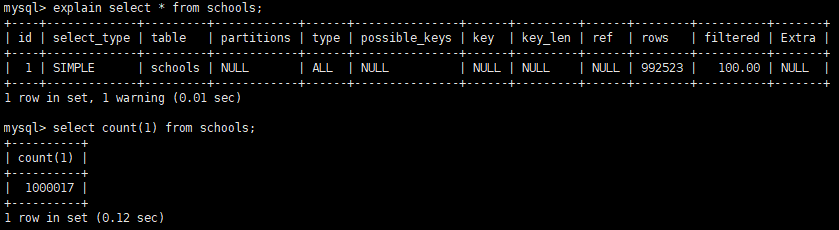
filtered
预估 WHERE 条件后的满足条件的数据的百分比,越接近 100 越好。
Extra
Extra 是优化器提供的一些额外信息,让我们更好的分析优化器如何查询数据的。
Using index
表示索引覆盖了所需要的数据,无需回表操作,叫做索引覆盖,性能比较好。
explain select city_id,id from schools;查询 city_id 和 id ,使用 idx_city 索引进行查询,索引包含了两个字段,无需回表。

查询索引没有的字段情况:
explain select city_id,id,name from schools;
Using where
表示当前查询条件存储引擎无法完全过滤,需要回到 Server 层再重新过滤的情况。常见的情况于索引无法完全覆盖查询条件、查询条件无索引、索引失效等情况。
索引无法完全覆盖查询条件
explain select * from schools where city_id = 1 and id > 5;查询使用主键索引进行查询,但是查询条件有两个,id > 5 条件可以直接由存储引擎过滤,city_id 需要存储引擎将数据查询出来返回给 Server 层进行额外过滤。

查询条件无索引
explain select * from schools where address = 'x';address 字段没有可用的索引,走全表,然后由 Server 层进行过滤。

索引失效
explain select * from schools where city_id-1 = 2;和查询条件无索引差不多,只能由 Server 层进行过滤。

explain select * from schools where city_id = rand();
Using index condition
索引下推,存储引擎层尽可能尝试过滤数据,减少回表比较的数据量。
explain select * from schools where city_id > 1;这个有点没搞懂,先不管了。

Using filesort
无法直接通过索引获取排序结果,需要额外再重新排序一次。
explain select * from schools where id > 500 order by name;
Using join buffer
连接查询时,被驱动表没有索引可用,分配了 join buffer 内存块加快访问速度。
有索引前:
explain select ss.name,cs.name from schools ss left join citys cs on cs.id = ss.city_id;
删除索引后:
alter table citys drop index uni_name;
explain select ss.name,cs.name from schools ss left join citys cs on cs.id = ss.city_id;
Using temporary
临时表。常见 UNION、GROUP BY 子句中。
explain select name from schools union select name from citys;
explain select city_id from schools group by city_id;
本作品采用 知识共享署名-相同方式共享 4.0 国际许可协议 进行许可。